Introduction
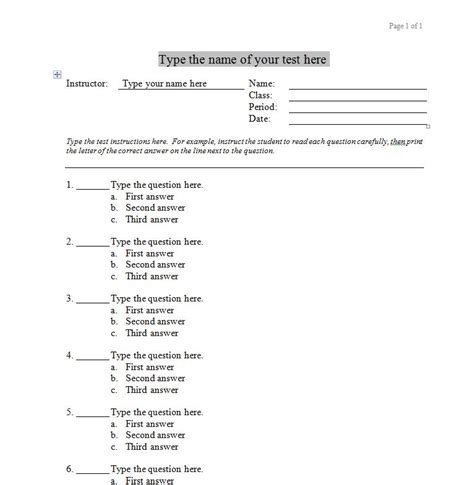
Multiple choice tests are a widely used assessment tool in various educational settings. They offer a convenient and efficient way to measure students’ knowledge and understanding. However, creating a rigorous and effective multiple choice test template requires careful planning. This article provides a comprehensive guide to developing high-quality multiple choice test templates that can enhance student learning.

Table 1: Common Mistakes to Avoid When Creating Multiple Choice Tests
| Mistake | Correction |
|---|---|
| Unclear or ambiguous question wording | Use precise and concise language |
| Grammatical or spelling errors | Proofread carefully |
| Redundant or repetitive options | Formulate distinct and informative options |
| Too many or too few options | Provide 2-5 options per question, typically 3-4 |
| Obvious or irrelevant correct answer | Ensure all options are plausible and the correct answer is not easily identifiable |
Step-by-Step Approach to Creating a Multiple Choice Test Template
Step 1: Define Learning Objectives
Start by clearly defining the learning objectives that the test will assess. This will serve as the foundation for developing relevant and focused questions.
Step 2: Determine Question Types
Consider the range of cognitive levels to be tested and select appropriate question types. Common types include:
- Knowledge questions: Test basic recall of facts and definitions
- Comprehension questions: Assess understanding of concepts and ideas
- Application questions: Measure the ability to apply knowledge to new situations
- Analysis questions: Require students to break down information and identify relationships
- Evaluation questions: Encourage students to make judgments and form opinions
Step 3: Formulate Questions and Answer Options
Craft clear and specific questions that align with the learning objectives. Provide answer options that are both plausible and informative, avoiding trickery or vague statements.
Step 4: Create a Scoring Rubric
Establish a scoring rubric that outlines the criteria for awarding points. Determine the number of correct answers required for each question and specify partial credit or bonus points if appropriate.
Step 5: Validate and Revise
Share the test template with colleagues or experts for feedback. Gather data on student performance and use it to refine and improve the test over time.
Key Considerations in Template Design
Table 2: Essential Elements of a Multiple Choice Test Template
| Element | Purpose |
|---|---|
| Question stem | Presents the question or incomplete statement |
| Answer options | Provides a list of possible answers |
| Correct answer | Indicates the intended correct response |
| Difficulty level | Specifies the level of knowledge or skills required to answer the question |
| Distractors | Plausible but incorrect answer options |
Additional Considerations:
Test Length: Determine the appropriate number of questions based on the time limit and learning objectives.
Question Distribution: Ensure a balanced distribution of question types and difficulty levels.
Visual Clarity: Use clear fonts and spacing to enhance readability.
Creativity and Innovation in Multiple Choice Testing
Table 3: Creative Applications of Multiple Choice Tests
| Application | Example |
|---|---|
| Diagnostic Assessment | Identify individual student strengths and weaknesses |
| Formative Assessment | Monitor student progress and provide feedback |
| Summative Assessment | Evaluate student achievement at the end of a unit or course |
| Adaptive Assessment | Adjust test difficulty based on student responses |
| Gamification | Incorporate game-like elements to engage students |
Frequently Asked Questions (FAQs)
1. How many answer options should I provide per question?
Typically, 2-5 options are recommended, with 3-4 being the most common.
2. How do I prevent student guessing?
Use a variety of question formats, such as “best answer” or “most accurate,” and avoid obvious or irrelevant correct answers.
3. Can I use images or graphics in multiple choice tests?
Yes, images or graphics can be used to supplement questions and provide additional context. However, ensure they are clear and relevant to the learning objectives.
4. How can I ensure fairness and impartiality in my test templates?
Avoid using biased language or stereotypes in question wording and answer options. Provide clear instructions and scoring rubrics to all students.
5. How often should I revise and update my test templates?
Regularly review and update test templates based on student feedback and changes in curriculum or learning objectives.
Conclusion
Creating effective multiple choice test templates is an essential skill for educators. By following the principles and best practices described in this article, teachers can develop high-quality assessments that accurately measure student learning, promote critical thinking, and facilitate effective instructional practices.
Table 4: Key Statistics on Multiple Choice Tests
| Statistic | Source |
|---|---|
| Multiple choice tests represent over 70% of standardized tests administered in the United States. | National Center for Education Statistics |
| Research indicates that students who take multiple choice tests perform better on subsequent open-ended assessments. | Educational Testing Service |
| Teachers spend approximately 30 minutes creating each multiple choice question. | University of Maryland |