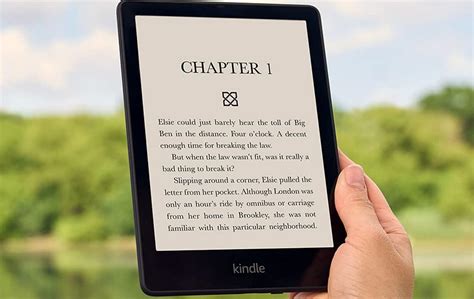
The all-new Kindle Paperwhite 2023 is here, promising a captivating reading experience that will transport you to worlds unknown. With its enhanced features and intuitive design, navigating this e-reader is a breeze. Dive into this comprehensive guide to discover everything you need to know about using your Kindle Paperwhite 2023.

Getting Started
- Unbox and Charge: Unpack your Kindle and connect it to a power source using the included USB cable. Allow it to charge fully before first use.
- Set Up Wi-Fi: Select “Settings” from the home screen, then “Wi-Fi” and follow the prompts to connect to a wireless network.
- Create or Sign in to Your Amazon Account: If you don’t have an Amazon account, create one by tapping “Sign Up.” If you already have an account, sign in using your credentials.
Navigating the Interface
- Home Screen: The home screen displays a list of your books, audiobooks, and other content. Tap on any item to open it.
- Library: Tap “Library” at the bottom of the screen to access all of your content, organized by categories.
- Menu: From the home screen, tap the three-line icon in the top left corner to access the menu, which provides additional settings and options.
- Settings: Adjust display settings, account preferences, and other options by selecting “Settings” from the menu.
Reading Features
- Page Turning: Swipe left or right on the screen to turn pages. You can also tap on the left or right side of the screen to activate page-turning buttons.
- Highlighting and Note-Taking: Tap on a word or phrase to highlight it. Tap on the highlighted text to create a note or add it to your dictionary.
- Font and Size Adjust: Change the font and size of the text by tapping the “Aa” icon in the top right corner of the screen.
- Dictionary and Wikipedia: Tap on any word to access the built-in dictionary or Wikipedia for quick reference.
Connectivity
- Wi-Fi: Kindle Paperwhite 2023 supports the latest Wi-Fi standards, ensuring a fast and stable connection for downloading books and browsing the internet.
- Bluetooth: Connect wireless headphones or speakers to your Kindle using Bluetooth.
- Whispersync: Automatically sync your reading progress, highlights, and notes across all your devices.
Tips and Tricks
- Create Collections: Organize your books into custom collections by tapping “Library” and then “Create New Collection.”
- Send-to-Kindle: Send books from your computer or phone to your Kindle using the “Send-to-Kindle” feature.
- Set a Reading Goal: Stay motivated by setting a reading goal and tracking your progress in the “Settings” menu.
- Use the Feature Store: Discover new reading-enhancing features, such as text-to-speech, by visiting the Feature Store in the “Settings” menu.
- Explore Prime Reading: Amazon Prime members have access to a vast library of books and magazines through Prime Reading.
Innovative Applications
- Novelty Writing: Utilize the Kindle’s note-taking capabilities to brainstorm ideas and draft your own novels.
- Foreign Language Immersion: Read books in your target language to improve your vocabulary and grammar.
- Journaling on the Go: Transform your Kindle into a personal journal, jotting down thoughts, experiences, and reflections.
- Mind Mapping: Take advantage of the touchscreen and highlight features to create visual mind maps for organizing knowledge.
Technical Specifications
| Feature | Specification |
|---|---|
| Display | 6.8-inch E Ink Carta 1200 |
| Resolution | 300 ppi |
| Lighting | Adjustable warm and cool light |
| Storage | 8GB or 16GB |
| Battery Life | Up to 10 weeks |
| Weight | 182 grams |
| Dimensions | 174 x 125 x 8.1 mm |
Conclusion
The Kindle Paperwhite 2023 is a refined e-reader that empowers readers with its extensive functionality and ease of use. Whether you’re an avid bookworm or a casual reader, this guide provides everything you need to know to master your Kindle and unlock the boundless possibilities of the digital reading experience.